
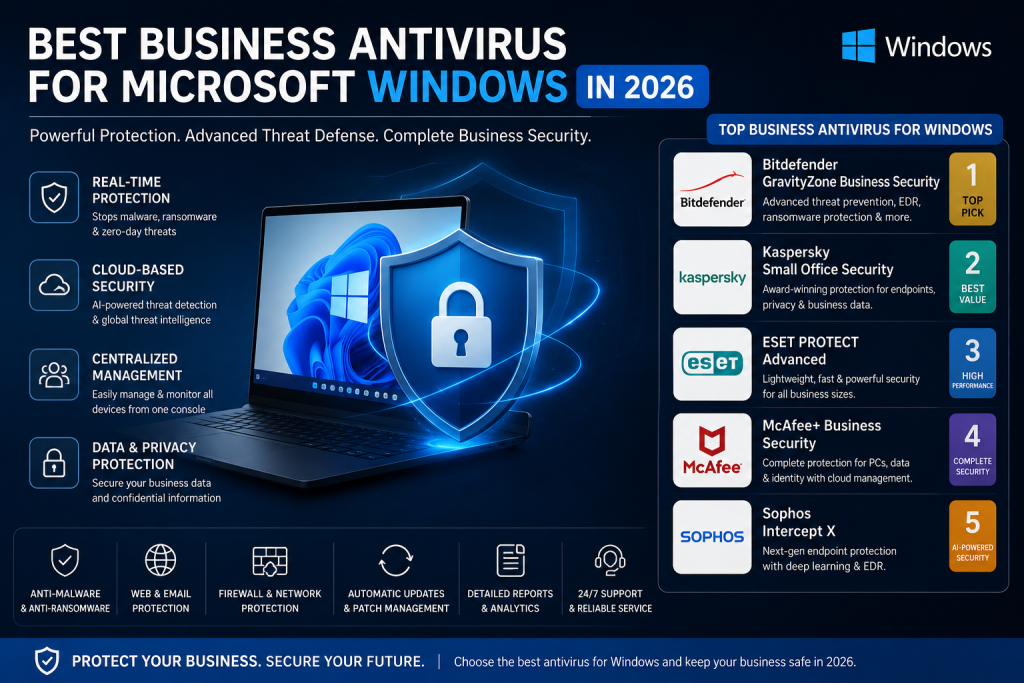
Every year, cyberattacks have become more advanced. Cyber threats can include malware, such as viruses and ransomware, as well as attacks like phishing that might harm your business computers. Even though Microsoft Windows offers some form of security systems, there is still a need for an advanced antivirus program that can keep Microsoft Windows protected from all cyber threats.
Why Businesses Need Antivirus Protection
Windows computers are used by many businesses across industries, making endpoint security an important part of an organisation’s overall cybersecurity strategy. The security that comes with computers is called Microsoft Defender. It does not do enough to keep computers completely safe; that’s why organisation’s need an antivirus program for their systems.
Whether you manage IT for small businesses or large organizations , reliable antivirus software can add an extra layer of protection to your business computers. A good Windows antivirus provider can help protect company devices, important business data, employee information, and daily operations from cyber threats.
Top Antivirus Software for Microsoft Windows
The following are some great antivirus applications for the users:
Bitdefender Total Security
Bitdefender Total Security is highly efficient in checking and blocking cyber threats. It also helps keep you safe on the web and has a VPN. You can use Bitdefender Total Security on lots of devices. It is good for people who use the system for work.
McAfee Total Protection
McAfee Total Protection will provide total security to Windows PC in terms of antivirus software, firewall, and virtual private network. It will keep your system safe from any viruses, malware, and any other online threats. It will keep your personal details safe when checking on the internet.
Quick Heal
Quick Heal provides reliable antivirus protection for Windows systems. It protects system from malware, including viruses and ransomware, as well as other online threats. Some of its functionalities include real-time protection, safe browsing, and data security.
Sophos
Sophos is an excellent choice when it comes to advanced antivirus and cybersecurity software for users and organizations. The software protects devices from online threats such as ransomware, phishing attacks, and others. Sophos makes use of intelligent security tools to protect you from any kind of danger.
Trend Micro
Trend Micro delivers reliable antivirus software with advanced threat detection functionalities. The software protects from ransomware, phishing, and malicious websites. Some of its functionalities include safe browsing and user privacy protection.
Kaspersky
Kaspersky delivers efficient anti-virus, malware, ransomware, and online threats protection. It provides capabilities like real-time protection, safe browsing, and privacy security. Kaspersky protects personal information from being hacked by providing security for devices from cyber threats. It can be used both for personal and business purposes.
Microsoft Defender
Microsoft Defender is a security software installed on Windows devices. It gives real-time protection from viruses, malware, and other online threats. It ensures the security of files, applications, and online activity without any additional installations. Microsoft Defender provides basic security and ESET Internet Security works with Windows and provides protection against online threats.
Key Antivirus Features for Businesses
The following are some of the important features to consider when selecting the best antivirus programs:
- Real-time virus and malware protection
- Ransomware protection
- Phishing and email security
- Safe browsing
- Firewall protection
- VPN for safe internet connection
- Password manager
- Auto-update
- Multiple device protection
- Does not slow down the system
These features will allow you to have a safe computer against cyberattacks.
Select Antivirus for Microsoft Windows
When buying antivirus for your business, there are a number of factors you should take into consideration, such as:
- Understanding what kind of protection system is required.
- Compare antivirus features.
- Select a reputable antivirus software product.
- Purchase a genuine software license.
- Choose the right plan according to your financial capacity.
- Get the product through an authorized vendor.
- Good antivirus software should give full protection without affecting the performance of the system.
Benefits of Antivirus for Microsoft Windows
Here is a list of some benefits that come with having antivirus software installed on the system:
- Your personal information stays secure.
- Protection from viruses, ransomware, and other cyber threats.
- It makes sure of the safety of your online transactions.
- You will not be able to visit any suspicious websites or fall victim to a phishing attack.
- It helps keep your online activities safe.
- Offers regular updates for your computer security.
- Improves the performance of your computer.
Why Businesses Need a Genuine Antivirus
Using Genuine antivirus software helps you get:
- Original product activation keys
- Updates to the software
- The latest security features
- Technical assistance from the antivirus vendor
- Increased security against all new cyber risks
Avoid using any unlicensed or cracked antivirus programs, as such a move may endanger your computer.
Conclusion
Selecting the right antivirus for Microsoft Windows in 2026 is very important in protecting the system from all the cyber risks in today’s digital world. Antivirus plays a vital role in making sure that your data and online transactions remain safe and also ensures that the performance of your system remains efficient. Purchaing licensed antivirus from a authorised reseller in order to get certified licenses, updates, and support services. Wroffy is among the most trusted resellers of genuine antivirus software.